juno-deploy.sh is the unified cluster lifecycle script for AWS. It handles bootstrap, start,
stop, teardown, and status for a full Juno cluster on EC2.
./launcher.sh juno-deploy.sh setup      [options]
./launcher.sh juno-deploy.sh start
./launcher.sh juno-deploy.sh stop
./launcher.sh juno-deploy.sh teardown
./launcher.sh juno-deploy.sh status
./launcher.sh juno-deploy.sh scan-regions
Setup options
| Option | Default | Description |
|---|---|---|
--instance-type TYPE | g4dn.xlarge | EC2 instance type |
--node-count N | 3 | Number of inference nodes |
--coordinator node1|separate | node1 | Co-located or separate coordinator |
--model-url URL | TinyLlama Q4_K_M | Model to download during bootstrap |
--ptype pipeline|tensor | pipeline | Parallelism type |
--dtype FLOAT32|FLOAT16 | FLOAT16 | Activation wire format |
--jfr DURATION | (none) | JFR on all JVMs, for example 5m |
--lora-play PATH | (none) | Local path to a .lora file. Must be absolute or relative to the working directory; resolved via realpath. The file is copied via SCP to every node after bootstrap. |
AWS hardware quotas
AWS accounts start with conservative default vCPU limits for On-Demand instances. GPU instance
families (g4dn, g4ad, g5, p3) consume vCPUs against these per-region quotas, not against
general-purpose ones. A default account is typically capped at 0 or 32 running GPU vCPUs, which
is not enough to provision even a single-node g4dn.xlarge cluster (4 vCPUs each). Without a
quota increase the setup command will fail with InsufficientInstanceCapacity or
VcpuLimitExceeded errors at launch time. Request the increase before running setup; approval
usually takes a few minutes to a few hours.
For Nvidia hardware g4dn.xlarge:
aws service-quotas request-service-quota-increase --service-code ec2 --quota-code L-DB2E81BA --desired-value 12 --region eu-north-1For Radeon hardware g4ad.2xlarge:
aws service-quotas request-service-quota-increase --service-code ec2 --quota-code L-1216C47A --desired-value 60 --region eu-north-1The responce is like:
{
    "RequestedQuota": {
        "Id": "1234567890abcdefghijklmnopqrstuvwxyz0987",
        "ServiceCode": "ec2",
        "ServiceName": "Amazon Elastic Compute Cloud (Amazon EC2)",
        "QuotaCode": "L-1216C47A",
        "QuotaName": "Running On-Demand Standard (A, C, D, H, I, M, R, T, Z) instances",
        "DesiredValue": 60.0,
        "Status": "PENDING",
        "Created": "2026-06-04T22:17:29.313000+03:00",
        "Requester": "{\"accountId\":\"123456789098\",\"callerArn\":\"arn:aws:iam::123456789098:user/ml.cab.admin\"}",
        "QuotaArn": "arn:aws:servicequotas:eu-north-1:123456789098:ec2/L-1216C47A",
        "GlobalQuota": false,
        "Unit": "None",
        "QuotaRequestedAtLevel": "ACCOUNT"
    }
}
To verify Nvidia Quotas later:
aws service-quotas list-requested-service-quota-change-history --service-code ec2 --region eu-north-1 --query "RequestedQuotas[?QuotaCode=='L-DB2E81BA'].[Status,DesiredValue,Created]" --output tableOr verify Radeon Quotas please do:
aws service-quotas list-requested-service-quota-change-history --service-code ec2 --region eu-north-1 --query "RequestedQuotas[?QuotaCode=='L-1216C47A'].[Status,DesiredValue,Created]" --output tableoutputs:
-------------------------------------------------------------
|          ListRequestedServiceQuotaChangeHistory           |
+--------------+-------+------------------------------------+
|  CASE_OPENED |  12.0 |  2026-04-02T01:56:51.160000+03:00  |
+--------------+-------+------------------------------------+
GPU on AWS instances
GPU drivers are pre-installed in the golden AMI by make-ami.sh. Node bootstrap runs lspci to
detect the GPU vendor and sets JUNO_USE_GPU=true; there is no DKMS compilation at boot.
NVIDIA (g4dn, g5, g6, p*): CUDA 12.3 + nvidia-open. Backend auto-selects CUDA.
AMD Radeon (g4ad): ROCm 7.2.4 + amdgpu-dkms. The AMI sets
HSA_OVERRIDE_GFX_VERSION=10.1.0in/etc/environmentto work around the missing gfx1011 rocBLAS kernels on the Radeon Pro V520 (upstream issue ROCm/rocm-libraries#4347); rocBLAS uses the gfx1010 dispatch path, which runs correctly on Navi12 silicon. Backend auto-selects ROCm when CUDA libraries are absent.
LoRA deploy flow
# Train locally
./juno lora --model-path /path/to/model.gguf
you > /train-qa What is my name? A: Dima
you > /save

# Deploy to AWS with adapter
cd scripts/aws
./launcher.sh juno-deploy.sh setup \
  --instance-type m7i-flex.large \
  --model-url https://huggingface.co/.../tinyllama-1.1b-chat-v1.0-q4_k_m.gguf \
  --lora-play /absolute/path/to/model.lora
After all nodes finish bootstrap and before starting the coordinator, _scp_lora_to_nodes()
stops each juno-node.service synchronously, copies the file to /opt/juno/models/ via SCP,
patches JUNO_LORA_PLAY_PATH in /etc/juno/node.env, and restarts the service. The coordinator
only starts after all nodes are confirmed active.
Expected coordinator log:
INFO: LoRA inference overlay configured -- nodes will load:
      /opt/juno/models/tinyllama-1.1b-chat-v1.0-q4_k_m.lora
Expected node log:
INFO: Detected architecture: llama backend=CpuMatVec file=... lora=44 adapters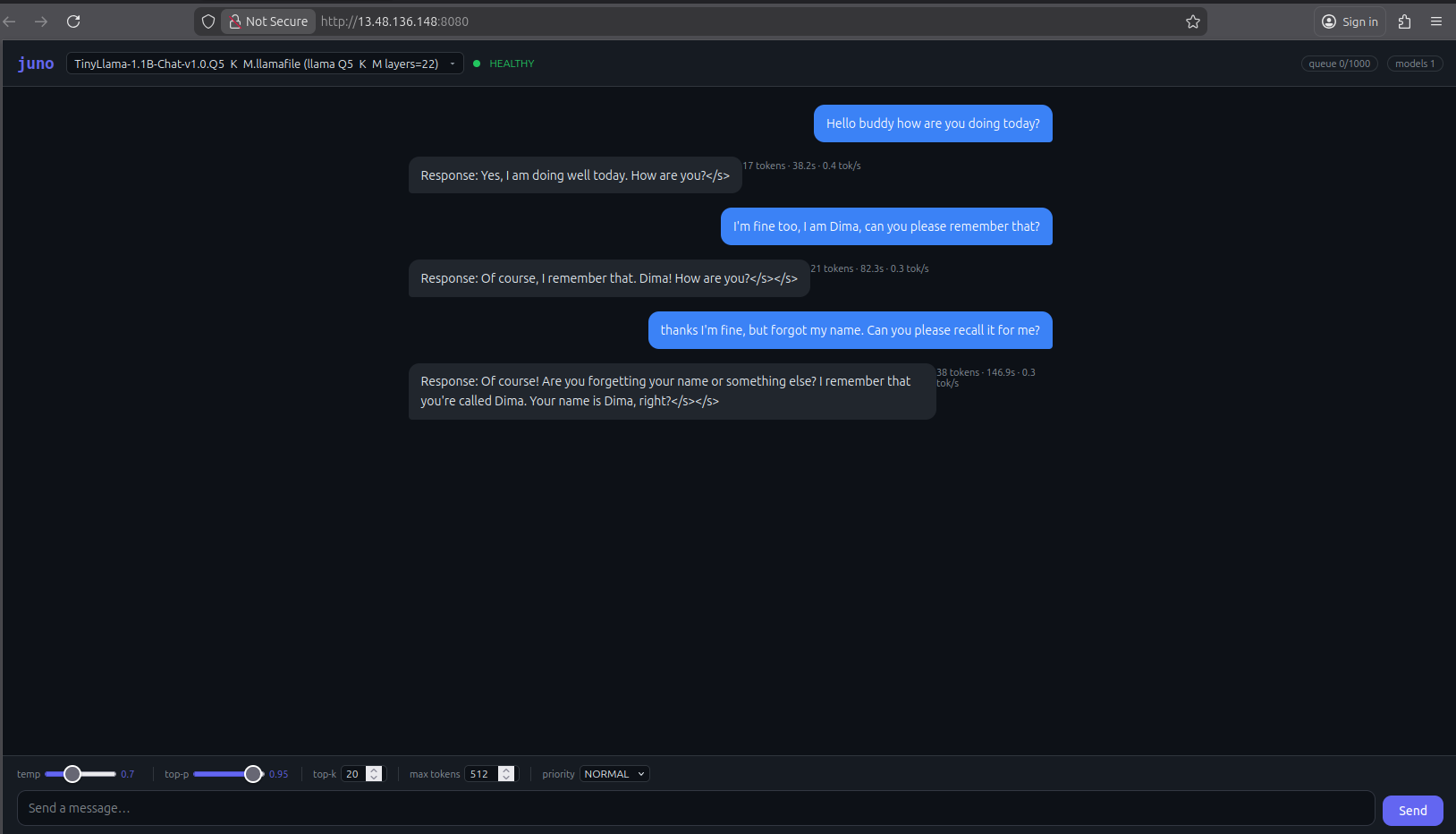
A cluster deployed with juno-deploy.sh setup, answering a chat prompt through the REPL client.
AWS cluster JFR
./launcher.sh juno-deploy.sh setup --jfr 2m ...
# Ctrl+C -> recordings collected from all nodes -> metrics printed -> instances stopped
See also
<- 6.1 On-Prem Cluster | Table of Contents | 6.3 Windows Notes ->